
Check and share an offer#
Open an accepted request and check its offer status, unit price, maximum quantity and expiry. Copy coupon copies the code; Copy offer link copies the product link used by the guided redemption flow. Both actions recheck availability before copying. If your browser blocks clipboard access, select and copy the text shown by the app.
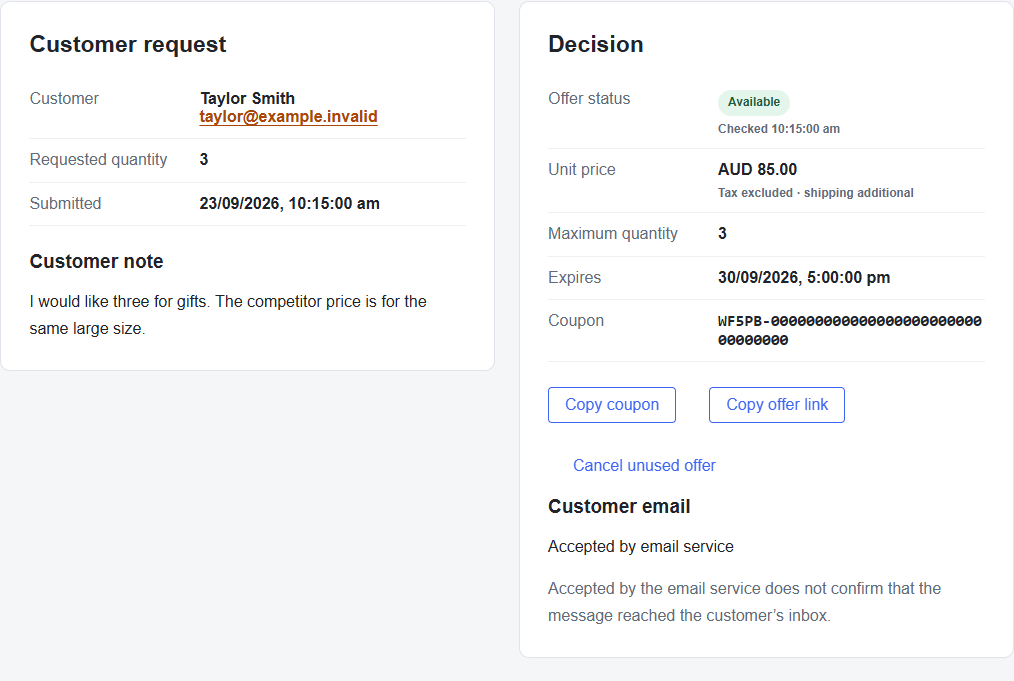
Codes are unique and difficult to guess, but they are transferable: they are not restricted to the original customer. Share them only with the intended recipient.
Using an accepted offer#
The offer link opens the relevant product page. The customer selects Use your Price Beat offer and signs in when prompted. They choose an eligible quantity up to the approved maximum and continue through the guided cart flow. Confirm the applied discount and final checkout total before placing the order.
Each coupon can be redeemed once. Buying fewer than the approved maximum does not leave a balance for another order. Shipping and applicable tax still follow the store’s checkout rules. Signing in to the guided flow does not bind the native coupon to a particular customer.
Cancel an unused offer#
- Open the accepted request and select Cancel unused offer when available.
- Enter an Internal cancellation reason.
- Select Confirm cancellation and wait for the result.
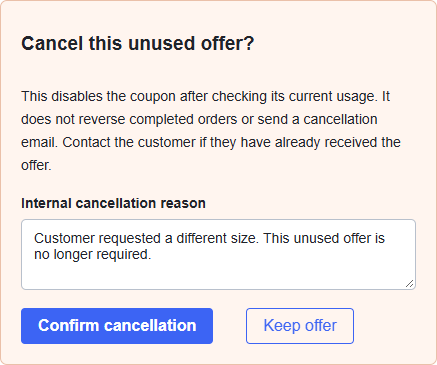
The app checks usage and disables the native promotion. If cancellation is still pending, use Check cancellation before telling the customer it has finished. If redemption completes first, the result is recorded as redeemed.
Cancellation does not reverse completed orders or send a cancellation email. Contact the customer separately if they already received the offer. The original accepted decision and cancellation reason remain in the record.