
Find the next request#
Open Requests in the sidebar. Use the status tabs, search by customer, email, SKU or reference, and choose a sort order. Pending first · oldest waiting puts the oldest undecided requests first. Waiting over 24 hours narrows the list to overdue pending requests.
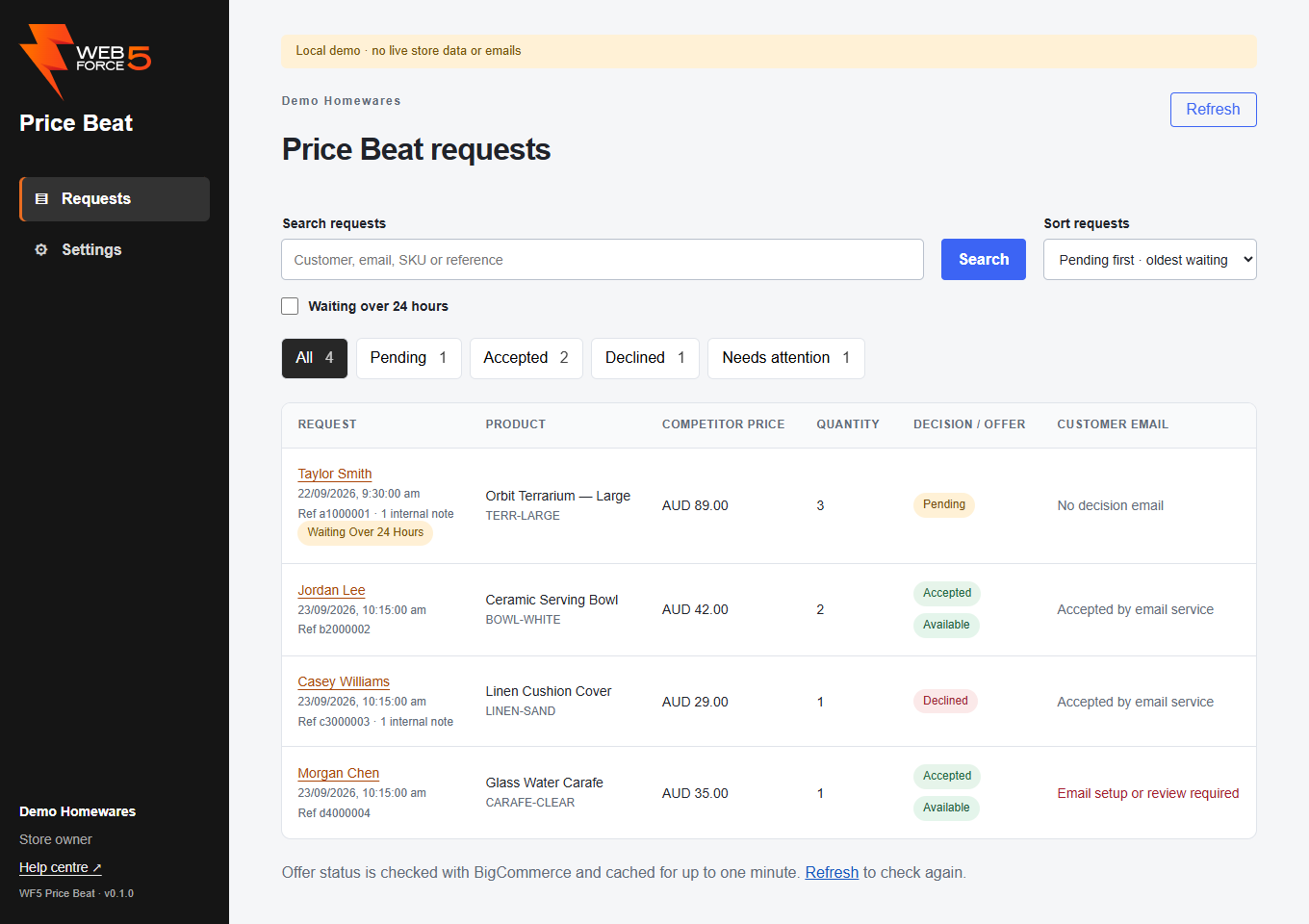
Select the customer name to open the request. Search and filter choices stay in place when you navigate around the same workspace.
Read the status columns#
Decision / offer shows whether the request is pending, being prepared, accepted or declined. An accepted request also has an offer status such as Available, Redeemed, Expired or Cancelled. Acceptance remains in the history even after the offer expires or is cancelled.
Customer email is separate. An available coupon does not prove that the customer has received an email. Open Needs attention to investigate offers or emails that require follow-up.
Refresh offer status#
Inbox offer status is checked with BigCommerce and cached for up to one minute. Select the blue Refresh link beneath the list, or the Refresh button at the top, to check again. Request details and copy actions also check the current native offer.
If a status is unavailable, refresh before promising the customer that the coupon will work. See Troubleshooting.